Tips to Reduce Zoom Fatigue
Posted: November 15, 2020 Filed under: behavior, computer, digital devices, ergonomics, Exercise/movement, health, laptops, Neck and shoulder discomfort, Pain/discomfort, self-healing, stress management, Uncategorized, vision 1 CommentAdapted from the book, TechStress: How Technology
is Hijacking our Lives, Strategies for Coping and Pragmatic Ergonomics, by Erik Peper, Richard Harvey and Nancy Faass.



Peper, E., Harvey, R., & Faass, N. (2020), TechStress-How Technology is Hijacking our Lives, Strategies for Coping and Pragmatic Ergonomics. Berkeley, CA: North Atlantic Books.
Breaking the social bond: The immobilized face
Posted: October 13, 2020 Filed under: behavior, computer, digital devices, Evolutionary perspective, health, laptops, self-healing, stress management | Tags: baby, communication, non verbal communication, Tier Social Stress Test, zoom fatigue 5 CommentsAfter teaching for hours on Zoom, I feel exhausted. Zoom fatigue is real.
While talking to a close friend, all of a sudden his attention shifted from listening to me to looking his cellphone as he heard a notification. At that moment, I felt slightly left and hurt.
Students report that when they are are talking with friends and their friends look at their cellphone or responds to a notification they feel hurt and slightly dismissed. Even though most experience this break in social bonding, almost all do this with others. The looking at the phone is the conditioned stimuli to which we automatically respond when we feel it vibrate or even when we see it. We respond by shifting our attention to the phone in the same way that Pavlov’s dogs would salivate when they heard the bell that was conditioned with the food. On the average we now check our phones 96 times a day—that is once every 10 minutes and an increase of 20% as compared to two years ago (Asurion Research, 2019).
To feel SAFE is essential for growth and developing intimacy. We interpret being safe through the process of neuroception. Without conscious awareness our brain processes facial cues to identify if the interactions are safe or not safe. If safe, vigilance and sympathetic arousal is reduced and better communication is supported (Porges, 2017). On the other hand, if a person’s face is flat and non-responsive during a conversation, it may signal danger and trigger fight/flight in the person seeing the non-reactive face. This unconscious stress reaction to a non-responsive face is the basis of the Tier Social Stress Test. In this stress assessment, participants are asked to give a presentation and are also given an unexpected mental arithmetic test in front of an panel of judges who do not provide any feedback or encouragement (Allen et al, 2016)). Not receiving social feedback while communicating is one of the most stressful events –it is being stuck in social quicksand as there are no cues to know what is going on.
We wonder if the absence of confirmative facial feedback is a component of Zoom fatigue when presenting to a larger group in which you see multiple faces as small postage stamps or no face at all. In those cases, the screen does not provide enough covert facial and body feedback to know what is going on as you are communicating. The audience non-responsive faces may covertly signal DANGER, The decrease visual and auditory signals is compounded by:
- Technical issues due to signal bandwidth and microphone (freezing of the screen, pixilation of the display, breakup in sound, warbling of voice, etc.).
- Viewers sitting still and facially immobilized without reacting as they watch and listen.
- Time delay caused by participants turning on the microphone before speaking may be negatively evaluated by the listener (Roberts, Margutti, & Takano, 2011).
- Non-recognizable faces because the face and upper torso are not illuminated and blacked out by backlighting or glare.
- Lack of eye and face contact because the speaker or participant is looking at the screen and their camera is to the side, below or above their face.
- Multi-tasking by the speaker who simultaneously presents and monitors and controls the Zoom controls such as chat or screen share.
In normal communication, nonverbal components comprise a significant part of the communication (Lapakko, 2007; Kendon, 2004). We use many nonverbal cues (lip, eye, face, arm, trunk, leg and breathing movements) as well as olfactory cues to understand the message. In most group zoom meeting we only see the face and shoulders instead of an integrated somatic body response in a three-dimensional space as we look near and far. On the other hand, in front of the computer, we tend to sit immobilized and solely look at a two-dimensional screen at a fixed distance. As we look at the screen we may not process the evolutionary nonverbal communication patterns that indicate safety. Similarly, when child does not receive feedback as it reaches out, it often becomes more demanding or withdraws as the social bond is disconnected.

From: https://live.staticflickr.com/3724/11180721716_1baa040430_b.jpg
Communication is an interactive process that supports growth and development. When the child or a person reaches out and there is no response. The detrimental effect of interrupting facial responsiveness is demonstrated by the research of University of Massachusetts’s Distinguished University Professor of Psychology Edward Tronick (Goldman, 2010; Tronick et al, 1975).
How to maintain build social bonds
Recognize that being distracted by cellphone notifications and not being present are emotional bond breakers, thus implement behaviors that build social connections.
Zoom recommendations
- Arrange your camera so that your face and upper torso is very visible, there is no backlight and glare, and you are looking straight at the camera.
- Provide dynamic visual feedback by exaggerating your responses (nod your head for agreement or shake your head no for disagreement).
- When presenting, have a collaborator monitor Chat and if possible have them shift back and forth between share screen and speaker view so that the speaker can focus on the presentation.
- Use a separate microphone to improve sound.
- If the screen freezes or the sound warbles often an indication of insufficient bandwidth, turn off the video to improve the sound quality.
Social bonding recommendations
- Share with your friends that you feel dismissed when they interrupt your conversation to check their cell phone.
- When meeting friends, turn off the cell phone or put them away in another room so not to be distracted.
- Schedule digital free time with your children.
- During meal times, turn off cell phones or put them in another room.
- Attend to the baby or child instead of your cellphone screen.
For a detailed perspective how technology impacts our lives and what you can do about it, see our book, TechStress-How Technology is Hijacking our Lives, Strategies for Coping and Pragmatic Ergonomics (Peper, Harvey, & Faass, 2020). Available from: https://www.penguinrandomhouse.com/books/232119/tech-stress-by-erik-peper-phd/
References:
Asurion Research (November 19, 2019).Americans Check Their Phones 96 Times a Day.
Goldman, J.G. (2010). Ed Tronick and the “Still Face Experiment.” Scientific American, Oct 18.
Tronick, E., Adamson, L.B., Als, H., & Brazelton, T.B. (1975, April). Infant emotions in normal and pertubated interactions. Paper presented at the biennial meeting of the Society for Research in Child Development, Denver, CO.
Exploiting evolutionary traps: Netflix’s new movie, The Social Dilemma
Posted: September 20, 2020 Filed under: behavior, computer, digital devices, emotions, Evolutionary perspective, surgery, Uncategorized | Tags: addiction, anxiety, depression, evolutionary trap, Facebook, Google, Instagram, social media, suicide 1 Comment
Apple founder Steve Jobs didn’t let his kids use the iPad, or really any product their dad invented, As Steve Jobs stated, “They haven’t used it,” “We limit how much technology our kids use at home.” (Bilton, 2014).
In 2007, Bill Gates, the former CEO of Microsoft, implemented a cap on screen time when his daughter started developing an unhealthy attachment to a video game. He also didn’t let his kids get cell phones until they turned 14 (Akhtar & Ward, 2020).
What is it that these two titans of the tech revolution and the many Silicon Valley insiders know and discuss in the Netflix docudrama, The Social Dilemma?
They recognized the harm that occurs when monetary incentives are the singular driver to optimize the hardware (the look and feel of the cellphone) and much more important the software algorithms to capture the attention of the user. It is interesting that there are only two industries that label their customers as users, illegal drugs and software (Kalsim 2020).
The longer a user is captured by the screen, the more the user responds to notifications, the more the user clicks to other sites, the more money the corporation earns from its advertisers. The algorithms continuously optimize what the user sees and hears so that they stay captured. Thus, the algorithms are designed to exploit the evolutionary response patterns that allowed us to survive and thrive. Evolutionary traps occur when adaptive behaviors that were once successful become maladaptive or even harmful. When this occurs, cues that were protective or beneficial can lead to reduced health and fitness (Peper, Harvey & Faass 2020).
Companies exploit evolutionary traps for the purpose of improving profits. This potentially constitutes a major health risk for humanity. As quoted from the The Social Dilemma, “Your attention is the product that is being sold to advertisers”
Google, Facebook, Twitter, Instagram, Pinterest, and others are designed to be highly addictive and incorporate some of the following evolutionary traps (Peper, Harvey & Faass, 2020):
- We are wired to see artificial images and to hear reproduced sounds as real. The brain does not discriminate between actual and visual-auditory images that are artificial, which explains one aspect of our attraction to our phones, to binge-watching, and to gaming.
- We are wired to react to any stimuli that suggests potential danger or the presence of game animals. Whether the stimuli is auditory, visual, tactile, or kinesthetic, it triggers excessive arousal. This makes us vulnerable to screen addiction, because our biology compels us to respond.
- We are wired to attend to social information about power within our group, a major factor in social media addiction.
If you concerned about false news, political polarization, radicalization, increased anxiety, depression, suicides and mental health in people, watch Netflix, The Social Dilemma and the powerful presentation by Sacha Baron Cohen’s superb presentation, Never is Now, the 2019 Anti-Defamation League Leadership Award.
What makes this film so powerful is that it is told by the same people who were the designers, developers, and programmers for the different social media companies.

From: https://www.netflix.com/title/81254224
For an outstanding critique of social media and the power of Facebook, Twitter, and Google, watch Sacha Baron Cohen’s superb presentation at the 2019 Anti-Defamation League Leadership Award.
References:
Bilton, N. (Sept 10, 2014). Steve Jobs was a low-tech parent. New York Times.
Inna Khazan, PhD, interviews the authors of TechStress
Posted: August 18, 2020 Filed under: behavior, computer, digital devices, ergonomics, Evolutionary perspective, Exercise/movement, health, laptops, Neck and shoulder discomfort, Pain/discomfort, posture, stress management, Uncategorized, vision Leave a commentGo behind the screen and watch Inna Khazan, PhD, faculty member at Harvard Medical School and author of Biofeedback and mindfulness in everyday life: Practical solutions for improving your health and performance, interview Erik Peper, PhD and Richard Harvey, PhD. coauthors of the new book, TechStress-How Technology is Hijacking our Lives, Strategies for Coping and Pragmatic Ergonomics.
Dr. Inna Khazan interviews Dr. Erik Peper about his new book Tech Stress. We talk about some of the ways in which technology overuse affects our health and what we can do about it.
Dr. Inna Khazan interviews Dr. Rick Harvey about his new book Tech Stress, the way technology overuse can affect adults and children, and what we can do about it.
Ways to reduce TechStress
Posted: August 13, 2020 Filed under: ADHD, behavior, computer, digital devices, emotions, ergonomics, Evolutionary perspective, Exercise/movement, health, Neck and shoulder discomfort, Nutrition/diet, Pain/discomfort, posture, relaxation, self-healing, stress management, Uncategorized 5 CommentsWe are excited about our book, TechStress-How Technology is Hijacking our Lives, Strategies for Coping and Pragmatic Ergonomics, that was published August 25, 2020.
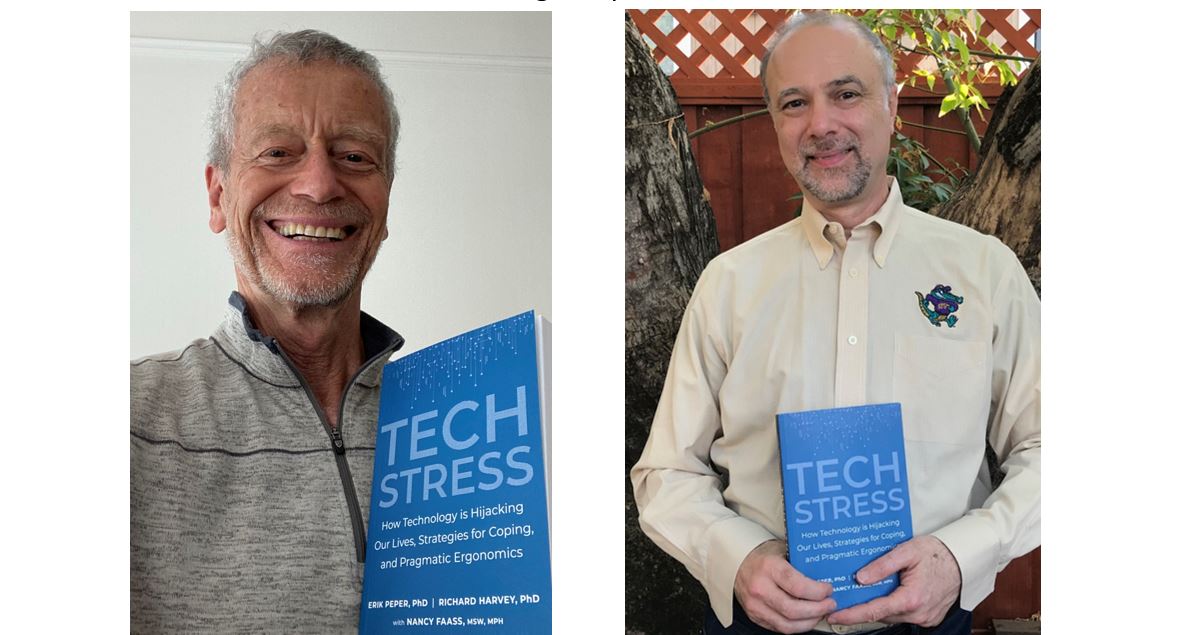
Evolution shapes behavior — and as a species, we’ve evolved to be drawn to the instant gratification, constant connectivity, and the shiny lights, beeps, and chimes of our ever-present devices. In earlier eras, these hardwired evolutionary patterns may have set us up for success, but today they confuse our instincts, leaving us vulnerable and stressed out from fractured attention, missed sleep, skipped meals, aches, pains, and exhaustion and often addicted to our digital devices.
Tech Stress offers real, practical tools to avoid evolutionary pitfalls programmed into modern technology that trip us up. You will find a range of effective strategies and best practices to individualize your workspace, reduce physical strain, prevent sore muscles, combat brain drain, and correct poor posture. The book also provides fresh insights on reducing psychological stress on the job, including ways to improve communication with coworkers and family.
Although you will have to wait to have the book delivered to your home, you can already begin to implement ways to reduce physical discomfort, zoom/screen fatigue and exhaustion. Have a look the blogs below.
How evolution shapes behavior
How to optimize ergonomics
Cartoon ergonomics for working at the computer and laptop
Hot to prevent and reduce neck and shoulder discomfort
Why do I have neck and shoulder discomfort at the computer?
Relieve and prevent neck stiffness and pain
How to prevent screen fatigue and eye discomfort
Resolve Eyestrain and Screen Fatigue
How to improve posture and prevent slouching
“Don’t slouch!” Improve health with posture feedback
How to improve breathing and reduce stress
Anxiety, lightheadedness, palpitations, prodromal migraine symptoms? Breathing to the rescue!
How to protect yourself from EMF
Cell phone radio frequency radiation increases cancer risk

Available from: https://www.penguinrandomhouse.com/books/232119/tech-stress-by-erik-peper-phd/
Why do I have neck and shoulder discomfort at the computer?
Posted: July 23, 2020 Filed under: behavior, computer, digital devices, ergonomics, Exercise/movement, laptops, Neck and shoulder discomfort, Pain/discomfort, posture, Uncategorized 8 CommentsAdapted from the upcoming book, TechStress: How Technology is Hijacking Our Lives, Strategies for Coping, and Pragmatic Ergonomics, by Erik Peper, Richard Harvey and Nancy Faass.
While working in front of screens, many of us suffer from Zoom/screen fatigue, iNeck, shoulder and back discomfort, tired eyes, exhaustion and screen addiction (Peper, 2020; Fosslien & Duffy, 2020; So, Cheng & Szeto, 2017; Peper & Harvey, 2018). As we work, our shoulders and forearms tense and we are often not aware of this until someone mentions it. Many accept the discomfort and pain as the cost of doing work–not realizing that it may be possible to work without pain.
Observe how you and coworkers work at the computer, laptop or cellphone. Often we bring our noses close to the screen in order to the text more clearly and raise our shoulders when we perform data entry and use the mouse. This unaware muscle tension can be identified with physiological recording of the muscles electrical activity when they contract (electromyography) (Peper & Gibney, 2006; Peper, Harvey & Tylova, 2006). In most cases, when we rest our hands on our laps the muscle tension is low but the moment we even rest our hands on the keyboard or when we begin to type or mouse, our muscles may tighten, as shown in Figure 1. The muscle activity will also depend on the person’s stress level, ergonomic arrangement and posture.
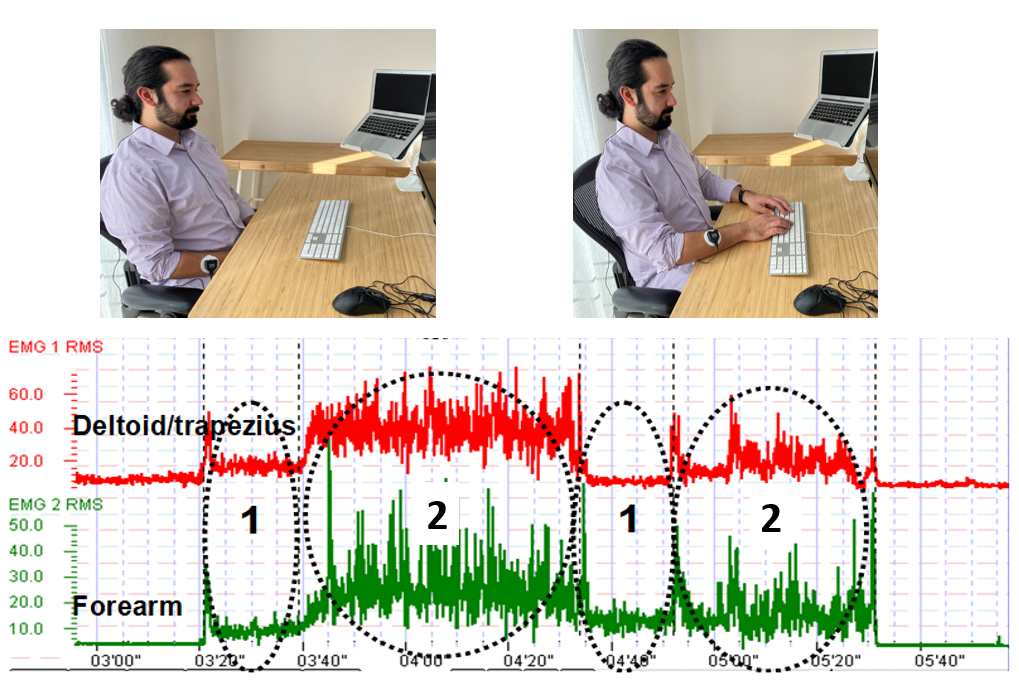 Figure 1. Muscle tension from the shoulder and forearm increased without any awareness when the person rested their hands on the keyboard (Rest Keyboard) and during typing and mousing. The muscles only relaxed when the hands were resting on their lap (Rest Lap) (reproduced by permission from Peper, Harvey, and Faass, 2020).
Stop reading from your screen and relax your shoulders. Did you feel them slightly drop and relax?
If you experienced this release of tension and relaxation in the shoulders, then you were tightening your shoulders muscles without awareness. It is usually by the end of the day that we experience stiffness and discomfort. Do the following exercise as guided by the video or described in the text below to experience how discomfort and pain develop by maintaining low-level muscle tension.
While sitting, lift your right knee two inches up so that the foot is about two inches away from the floor. Keep holding the knee up in this position. Did you notice your breathing stopped when you lifted your knee? Are you noticing increasing tension and discomfort or even pain? How much longer can you lift the knee up?
Let go, relax and observe how the discomfort dissipates.
Reasons for the discomfort
The discomfort occurred because your muscles were contracted, which inhibited the blood and lymph flow through the tissue. When your muscles contracted to lift your knee, the blood flow in those muscles was reduced. Only when your muscles relaxed could enough blood flow occur to deliver nutrients and oxygen as well as remove the waste products of metabolism (Wan et al, 2017). From a physiological perspective, muscles work most efficiently when they alternately contract and relax. For example, most people can walk without discomfort since their muscles contract and relax with each step. However, you could hold your knee up for a few minutes before experiencing discomfort in those same muscles.
How to prevent discomfort.
To prevent discomfort and optimize health, apply the same concept of alternating tensing and relaxing to your neck, shoulder, back and arm muscles while working. Every few minutes move your arms and shoulders and let them relax. Interrupt the static sitting position with movement. If you need reminders to get up and move your body during the workday or long periods sitting in front of a device, you can download and install the free app, StretchBreak.
For more information, read and apply the concepts described in our upcoming book, TechStress: How Technology is Hijacking Our Lives, Strategies for Coping, and Pragmatic Ergonomics. The book explains why TechStress develops, why digital addiction occurs, and what you can do to prevent discomfort, improve health and enhance performance. Order the book from Amazon and receive it August 25th. Alternatively, sign up with the publisher and receive a 30% discount when the book is published August 25th. https://www.northatlanticbooks.com/shop/tech-stress/
References
Peper, E. & Gibney, K. H. (2006). Muscle Biofeedback at the Computer: A Manual to Prevent Repetitive Strain Injury (RSI) by Taking the Guesswork out of Assessment, Monitoring and Training. Amersfoort: The Netherlands: Biofeedback Foundation of Europe. ISBN 0-9781927-0-2. Free download of the the book: http://bfe.org/helping-clients-who-are-working-from-home/
Wan, J. J., Qin, Z., Wang, P. Y., Sun, Y., & Liu, X. (2017). Muscle fatigue: general understanding and treatment. Experimental & molecular medicine, 49(10), e384. https://doi.org/10.1038/emm.2017.194
Resolve Eyestrain and Screen Fatigue
Posted: June 29, 2020 Filed under: Breathing/respiration, computer, digital devices, ergonomics, Exercise/movement, health, laptops, Neck and shoulder discomfort, Pain/discomfort, relaxation, stress management, Uncategorized, vision | Tags: blurry vision, computer vision syndrome, dry eyes, eyestrain, near vision stress, zoom fatigue 13 CommentsAdapted from: Peper, E., Harvey, R. & Faass, N. (2020). TechStress: How Technology is Hijacking Our Lives, Strategies for Coping, and Pragmatic Ergonomics. Berkeley: North Atlantic Books.

Forty percent of adults and eighty percent of teenagers report experiencing significant visual symptoms (eyestrain, blurry vision, dry eyes, headaches, and exhaustion) during and immediately after viewing electronic displays. These ‘technology-associated overuse’ symptoms are often labeled as digital eyestrain or computer vision syndrome (Rosenfield, 2016; Randolph & Cohn, 2017). Even our distant vision may be affected— after working in front of a screen for hours, the world looks blurry. At the same time, we may experience an increase in neck, shoulders and back discomfort. These symptoms increase as we spend more hours looking at computer screens, laptops, tablets, e-readers, gaming consoles, and cellphones for work, taking online classes, watching streaming videos for entertainment, and keeping connected with friends and family (Borhany et al, 2018; Turgut, 2018; Jensen et al, 2002).
Eye, head, neck, shoulder and back discomfort are partly the result of sitting too long in the same position and attending to the screen without taking short physical and vision breaks, moving our bodies and looking at far objects every 20 minutes or so. The obvious question is, “Why do we stare at and are captured by, the screen?” Two answers are typical: (1) we like the content of what is on the screen; and, (2) we feel compelled to watch the rapidly changing visual scenes.
From an evolutionary perspective, our sense of vision (and hearing) evolved to identify predators who were hunting us, or to search for prey so we could have a nice meal. Attending to fast moving visual changes is linked to our survival. We are unaware that our adaptive behaviors of attending to a visual or auditory signals activate the same physiological response patterns that were once successful for humans to survive–evading predictors, identifying food, and discriminating between friend or foe. The large and small screen (and speakers) with their attention grabbing content and notifications have become an evolutionary trap that may lead to a reduction in health and fitness (Peper, Harvey & Faass, 2020).
Near vision stress
To be able to see the screen, the eyes need to converge and accommodate. To converge, the extraocular muscles of the eyes tighten; to focus (accomodation), the ciliary muscle around the lens tighten to increase the curvature of the lens. This muscle tension is held constant as long as we look at the screen. Overuse of these muscles results is near vision stress that contributes to computer vision syndrome, development of myopia in younger people, and other technology-associated overuse syndromes (Sherwin et al, 2012; Enthoven et al, 2020).
Continually overworking the visual muscles related to convergences increases tension and contributes to eyestrain. While looking at the screen, the eye muscles seldom have the chance to relax. To function effectively, muscles need to relax /regenerate after momentary tightening. For the eye muscles to relax, they need to look at the far distance– preferably objects green in color. As stated earlier, the process of distant vision occurs by relaxing the extraocular muscles to allow the eyes to diverge along with relaxing the ciliary muscle to allow the lens to flatten. In our digital age, where screen of all sizes are ubiquitous, distant vision is often limited to the nearby walls behind a screen or desk which results in keeping the focus on nearby objects and maintaining muscular tension in the eyes.
As we evolved, we continuously alternated between between looking at the far distance and nearby areas for food sources as well as signals indicating danger. If we did not look close and far, we would not know if a predator was ready to attack us. Today we tend to be captured by the screens. Arguably, all media content is designed to capture our attention such as data entry tasks required for employment, streaming videos for entertainment, reading and answering emails, playing e-games, responding to text notifications, looking at Instagram and Snapchat photos and Tiktok videos, scanning Tweets and using social media accounts such as Facebook. We are unaware of the symptoms of visual stress until we experience symptoms. To illustrate the physiological process that covertly occurs during convergence and accommodation, do the following exercise.
Sit comfortably and lift your right knee a few inches up so that the foot is an inch above the floor. Keep holding it in this position for a minute…. Now let go and relax your leg.
A minute might have seemed like a very long time and you may have started to feel some discomfort in the muscles of your hip. Most likely, you observed that when you held your knee up, you most likely held your breath and tightened your neck and back. Moreover, to do this for more than a few minutes would be very challenging.
Lift your knee up again and notice the automatic patterns that are happening in your body.
For muscles to regenerate they need momentary relaxation which allows blood flow and lymph flow to occur. By alternately tensing and relaxing muscles, they can work more easily for longer periods of time without experiencing fatigue and discomfort (e.g., we can hike for hours but can only lift our knee for a few minutes).
Solutions to relax the eyes and reduce eye strain
- Reestablish the healthy evolutionary pattern of alternately looking at far and near distances to reduce eyestrain, such as:
- Look out through a window at a distant tree for a moment after reading an email or clicking link.
- Look up and at the far distance each time you have finished reading a page or turn the page over.
- Rest and regenerate your eyes with palming. While sitting upright, place a pillow or other supports under our elbows so that your hands can cover your closed eyes without tensing the neck and shoulders.

- Cup the hands so that there is no pressure on your eyeballs, allow the base of the hands to touch the cheeks while the fingers are interlaced and resting your forehead.
- Close your eyes, imagine seeing black. Breathe slowly and diaphragmatically while feeling the warmth of the palm soothing the eyes. Feel your shoulders, head and eyes relaxing. Palm for 5 minutes while breathing at about six breaths per minute through your nose. Then stretch and go back to work.
Palming is one of the many practices that improves vision. For a comprehensive perspective and pragmatic exercises to reduce eye strain, maintain and improve vision, see the superb book by Meir Schneider, PhD., L.M.T., Vision for Life, Revised Edition: Ten Steps to Natural Eyesight Improvement.
Increased sympathetic arousal
Seeing the changing stimuli on the screen evokes visual attention and increases sympathetic arousal. In addition, many people automatically hold their breath when they see novel visual or hear auditory signals; since, they trigger a defense or orienting response. At the same time, without awareness, we may tighten our neck and shoulder muscles as we bring our nose literally to the screen. As we attend and concentrate to see what is on the screen, our blinking rate decreases significantly. From an evolutionary perspective, an unexpected movement in the periphery could be a snake, a predator, a friend or foe and the body responds by getting ready: freeze, fight or flight. We still react the same survival responses. Some of the physiological reactions that occur include:
- Breath holding or shallow breathing. These often occur the moment we receive a text notification, begin concentrating and respond to the messages, or start typing or mousing. Without awareness, we activate the freeze, flight and fight response. By breath holding or shallow breathing, we reduce or limit our body movements, effectively becoming a non-moving object that is more difficult to see by many animal predators. In addition, during breath holding, hearing become more acute because breathing noises are effectively reduced or eliminated.
- Inhibition of blinking. When we blink it is another movement signal that in earlier times could give away our position. In addition, the moment we blink we become temporarily blind and cannot see what the predator could be doing next.
- Increased neck, shoulder and back tension. The body is getting ready for a defensive fight or avoidance flight.
Experience some of these automatic physiological responses described above by doing the following two exercises.
Eye movement neck connection: While sitting up and looking at the screen, place your fingers on the back of the neck on either side of the cervical spine just below the junction where the spine meets the skull.
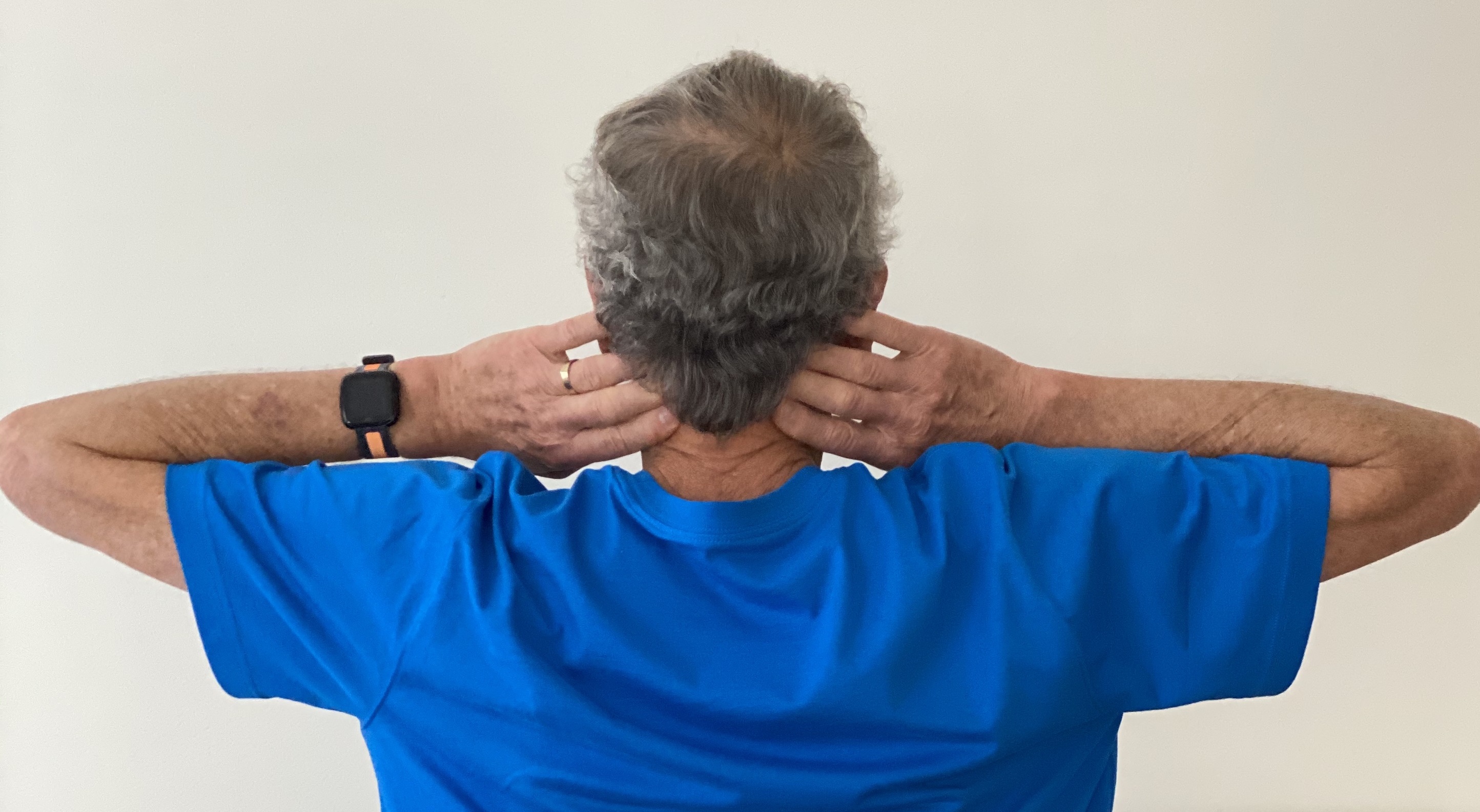
Feel the muscles of neck along the spine where they are attaching to the skull. Now quickly look to the extreme right and then to the extreme left with your eyes. Repeat looking back and forth with the eyes two or three times.
What did you observe? Most likely, when you looked to the extreme right, you could feel the right neck muscles slightly tightening and when you looked the extreme left, the left neck muscles slightly tightening. In addition, you may have held your breath when you looked back and forth.
Focus and neck connection: While sitting up and looking at the screen, place your fingers on the back of the neck as you did before. Now focus intently on the smallest size print or graphic details on the screen. Really focus and concentrate on it and look at all the details.
What did you observe? Most likely, when you focused on the text, you brought your head slightly forward and closer to the screen, felt your neck muscles tighten, and possibly held your breath or started to breathe shallowly.
As you concentrated, the automatic increase in arousal, along with the neck and shoulder tension and reduced blinking contributes to developing discomfort. This can become more pronounced after looking at screens to detailed figures, numerical data, characters and small images for hours (Peper, Harvey & Tylova, 2006; Peper & Harvey, 2008; Waderich et al, 2013).
Staying alert, scanning and reacting to the images on a computer screen or notifications from text messages, can become exhausting. in the past, we scanned the landscape, looking for information that will help us survive (predators, food sources, friend or foe) however today, we react to the changing visual stimuli on the screen. The computer display and notifications have become evolutionary traps since they evoke these previously adaptive response patterns that allowed us to survive.
The response patterns occur mostly without awareness until we experience discomfort. Fortunately, we can become aware of our body’s reactions with physiological monitoring which makes the invisible visible as shown in the figure below (Peper, Harvey & Faass, 2020).

Representative physiological patterns that occur when working at a computer, laptop, tablet or cellphone are unnecessary neck and shoulder tension, shallow rapid breathing, and an increase in heart rate during data entry. Even when the person is resting their hands on the keyboard, forearm muscle tension, breathing and heart rate increased.
Moreover, muscle tension in the neck and shoulder region also increased, even when those muscles were not needed for data entry task. Unfortunately, this unnecessary tension and shallow breathing contributes to exhaustion and discomfort (Peper, Harvey & Faass, 2020).
With biofeedback training, the person can learn to become aware and control these dysfunctional patterns and prevent discomfort (Peper & Gibney, 2006; Peper et, 2003). However, without access to biofeedback monitoring, assume that you respond similarly while working. Thus, to prevent discomfort and improve health and performance, implement the following.
- Practice breathing lower and slower to reduce sympathetic activation. Every few minutes remember to breathe slowly in and out through the nose. See the following blogs for more detailed instructions:
- Blink many times. Blink each time you click on a link, after typing a paragraph or after entering a few numbers.
- Get up, move, stretch and wiggle.
- Every few minutes do a small movement such as rotating your shoulders, dropping your hands to your lap.
- Every twenty minutes get up, stretch and walk around to reduce the chronic muscle tension.
- Install the free Stretch Break software on your computer or laptop to remind you to stretch… and then shows you how. Download free version from: https://stretchbreak.com/.
- Use small portable muscle biofeedback devices to learn awareness of the covert muscle tension and how to work without unnecessary muscle tension. For detailed training procedures see the free downloadable book by Erik Peper and Katherine Gibney, Muscle Biofeedback at the Computer- A Manual to Prevent Repetitive Strain Injury (RSI) by Taking the Guesswork out of Assessment, Monitoring and Training.
Finally, for a comprehensive overview based on an evolutionary perspective that explains why TechStress develops, why digital addiction occurs. and what can be done to prevent discomfort and improve health and performance, see our new book by Erik Peper, Richard Harvey and Nancy Faass, Tech Stress-How Technology is Hijack our Lives, Strategies for Coping and Pragmatic Ergonomics.
References
Peper, E. & Gibney, K. (2006). Muscle Biofeedback at the Computer- A Manual to Prevent Repetitive Strain Injury (RSI) by Taking the Guesswork out of Assessment, Monitoring and Training. The Biofeedback Federation of Europe. Download free PDF version of the book: http://bfe.org/helping-clients-who-are-working-from-home/
Schneider, M. (2016). Vision for Life, Revised Edition: Ten Steps to Natural Eyesight Improvement. Berkeley: North Atlantic Books. https://self-healing.org/shop/books/vision-for-life-2nd-ed
Turgut, B. (2018). Ocular Ergonomics for the Computer Vision Syndrome. Journal Eye and Vision, 1(2).
Reduce TechStress at Home
Posted: March 19, 2020 Filed under: behavior, computer, digital devices, ergonomics, health, laptops, Neck and shoulder discomfort, Pain/discomfort, Uncategorized 8 CommentsAdapted from the book, Peper, E., Harvey, R., & Faass, (2020). Tech Stress: How Technology Is Hijacking Our Lives, Strategies for Coping, and Pragmatic Ergonomics. Berkeley: North Atlantic Books.

Numerous people report that working at the computer at home is more tiring than working in the office. Although there are obvious advantages to working at home, there are also disadvantages (e.g., no space to work, challenging ergonomics, no escape from the family, lack of nonverbal cues used to communicate, less informal sharing at the water cooler, increased multitasking by working and having to take care of the children).
A major challenge is having a comfortable work space in your home. This may mean finding a place to put the computer, keyboard and screen. For some it is the kitchen table, desk in the corner of the bedroom, or coffee table while other it is in a totally separate room.
Incorrect ergonomic arrangement and stressed work style often increases neck, shoulder discomfort and aggravates eye strain and tiredness. Regardless how your digital work space is organized, implement the following life and work style suggestions and ergonomics recommendations to promote health.
LIFE AND WORK STYLE SUGGESTIONS
Take many, many, many breaks. Movement breaks will reduce the covert static tension that builds up as we sit in static positions and work at the computer.
- Every few minutes take a small break such as stand up and wiggle or role your shoulders. When performing the movements, stop looking at the screen and look around the room or out the window.
- Every 30 minutes get up walk around for and move your body. Use timers to notify you every 30 minutes to take a break (e.g., cellphone alarms or personal digital assistants such as Hey Google, Siri, or Alexa).
Improve vision.
- Take vision breaks to reduce eye fatigue.
- Every few minutes look away from the screen and into the far distance and blink. If at all possible look outside at green plants which relaxes the near vision induced tension.
- Blink and blink again. When working at the computer we reduce our blinking rate. Thus, blink each time you click on a new link, finishing entering a column of numbers, etc.
- Close your eyes by letting the eye lids drop down as you also relax your jaw. Imagine a hook on top of your head which is pulling your head upward and at the same time drop your shoulders.
- Reduce glare and bright backgrounds
- Arrange your computer screen at 90 degrees to the brightest light source.
- Have a darker background behind you when participating in video conferencing (e.g., Zoom, Skype, GoToMeeting, WhatsApp, FaceTime). Your face will be visible.
Regenerate
- When stressed remember to breathe. As you inhale let your stomach expand as you exhale let the air flow out slowly.
- Stop watching and listening to the negative news (check the news no more than once a day). Watch positive and humorous movies.
- Get fresh air, go for a walk, and be in the sun
- Reconnect with friends and share positive experiences.
- Remind yourself, that this too shall pass.
ERGONOMIC RECOMMENDATIONS: MAKE THE WORLD YOURS
Good ergonomics means adapting the equipment and environment to you and not the other way around. Optimizes the arrangement of the chair, desk, keyboard, mouse, camera, screen and yourself as shown in Figure 1.
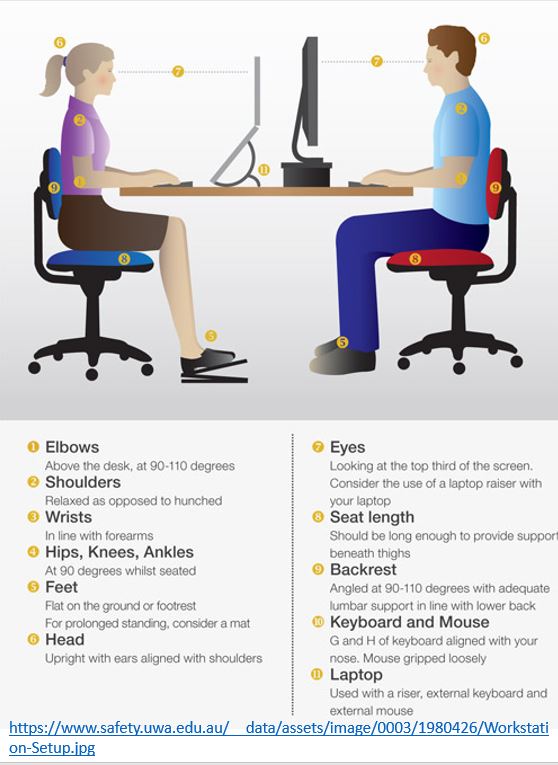
Figure 1. Recommended arrangement for working at the computer.
Arrange the laptop
The laptop is challenging because if your hands are at the right height for data entry on the keyboard, then you must look down to see the screen. If the screen at the right height, then you have to raise your hands to reach the keyboard. There are two solutions for this challenge.
- Use an external keyboard and mouse, then raise the laptop so that the top of the screen is at eye level. Use a laptop stand or a stack of books to raise the lap top.
- Use an external monitor for display, then use the laptop as your keyboard.
If these solutions are not possible, take many, many, many breaks to reduce the neck and shoulder stress.
Arrange the computer workstation
- Adjust the chair so that your forearms can rest on the table without raising your shoulders. This may mean sitting on a pillow. If the chair is then too high and your legs dangle, create a foot stool on which you can rest your feet.
- Adjust the monitor so that the top of the screen is at eye level. If the monitor is too low, raise it by putting some books underneath it.
- If possible, alternate standing and sitting while working.
RESOURCES
Book
Tech Stress: How Technology Is Hijacking Our Lives, Strategies for Coping, and Pragmatic Ergonomics provides insight in how discomfort, symptoms and media addiction develops and what you can do about it. It incorporates the role of evolutionary traps, how biofeedback makes the unaware aware, experiential physical and cognitive practices, and ergonomic recommendations to optimize health and productivity. A must book for anyone using digital devices. Peper, E., Harvey, R., & Faass, (2020). Tech Stress: How Technology Is Hijacking Our Lives, Strategies for Coping, and Pragmatic Ergonomics. Berkeley: North Atlantic Books.
Ergonomic suggestions for working at the computer and laptop.
https://peperperspective.com/2014/09/30/cartoon-ergonomics-for-working-at-the-computer-and-laptop/
11 tips for working at home
How our digital world activates evolutionary response patterns.
https://peperperspective.com/2018/02/10/digital-addiction/
How posture affects health
https://peperperspective.com/2019/07/01/dont-slouch-improves-health-with-posture-feedback/
https://peperperspective.com/2019/05/21/relieve-and-prevent-neck-stiffness-and-pain/
https://peperperspective.com/2019/01/23/head-position-it-matters/
 the peper perspective
